????️
**IT Info** New conference room names and capabilities
The new conference room names are available in Outlook and in Teams. Of course, the old ones are gone. It’s been quite a while since anybody has booked rooms so please be sure to book a space if you need it.
Adding them to the Teams calendar is a new feature and you can access it by clicking in the “Add location” box. You will get a pop-up of Seattle as a location and you can expand it to see all the rooms and book from within the Team’s calendar.
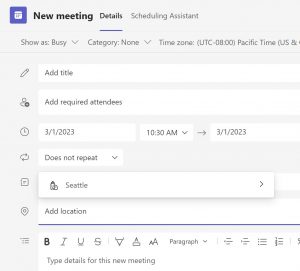
You can still book from Outlook as always and it will synchronize to Teams. But, for those of you that have tried in the past to do it via Teams, now it is available.
The three main conference (Sleepless, Jimi and Bruce) are done and each as video conferencing capabilities. That requires using the PC attached to the TV as it drives the video camera and audio mic and using the web version of Teams. Shortcuts on PC desktop and in browser bookmarks to take you to https://www.office.com/ where you can sign-in to your MS365 account and launch Teams. DO NOT load the Teams desktop app!
Since each room may have subtle differences and capabilities (mix of TVs with different capabilities and remotes), I will put together documentation for each one. I’ll keep it simple.
Rudy
More News
🏖️
Paid/Flexible Time Off Policy
Hi all, As promised, here is additional information on our new Paid Time Off plan (still looking for a name for it if anyone has ideas). We tried to...
Read More🎉
Welcome Kirsten, Programmatic Media Manager
We are very excited to welcome a new member to the media team! Kirsten Fischer will be our new Programmatic Media Manager. She will be in the office 5...
Read More👪
**IT Info** 1Password Families Account
GreenRubino purchased a 1Password Business plan, every team member can redeem a free 1Password Families account – a great way to build secure habits...
Read More